SyntaxHighlighter

Wednesday, 20 August 2014

Count the Rows of a Filtered Tablix

Been having some major ball aches with SSRS (SQL Server Reporting Services) recently -specifically around trying to hide elements and filter data.

In this instance, I needed to hide a row in a group if there were no rows in the filtered tablix. This is the process I followed:

1. Added a column to the tablix and set the column visibility to hidden

2. Added a text box to the header row and set the expression for it to: =CountRows()
3. Set the row visibility expression to this:
=(Int32.Parse(ReportItems!txtUsageDataRowCount.Value) <= 0)


An extra to note here is the use of ReportItems. It's a neat way of referring to a value in a text box. It does only work for text boxes

Tuesday, 19 August 2014

Error Applying Security - Failed to Enumerate Objects

I was recently trying to apply some security settings to a folder in Windows. When I clicked OK or Apply I had a Error Applying Security - Failed to enumerate objects in the container. Access is denied error for every single file in the folder. Very annoying!


I did some hunting around and came across this article. In this article, the author was unable to delete a folder, but the same process fixes the security/permissions error I was having. The commands are:

  1. Open the command window running as administrator
  2. Run the following commands on the folder in question:
takeown /f "C:\My Folder Path Here" /r /d y
icacls "C:\My Folder Path Here" /grant administrators:F /T

Sorted :) The permissions were then successfully applied.

Saturday, 22 March 2014

C# & VB.NET Trim String To a Specific Length

I needed to trim some strings that if over a certain length would trim nicely and add "..." to the end. I particularly like to use extension methods in .NET where possible so I created this little TrimTo extension. There are some optionals that can be sent through including the characters whack on the end and whether to swap out the HTML br tag (I needed this - you may not ;) )

C#
public static class Extensions
{
 /// <summary>
 /// <summary>
 /// Trim a string to a specific length
 /// </summary>
 /// <param name="size">The finishing size of the string</param>
 public static string TrimTo(this string s, int size)
 {
  return TrimTo(s, size, "...");
 }

 /// <summary>
 /// Trim a string to a specific length
 /// </summary>
 /// <param name="size">The finishing size of the string</param>
 /// <param name="chars">The characters to put at the end of the string. Defaults to "..."</param>
 public static string TrimTo(this string s, int size, string chars)
 {
  return TrimTo(s, size, chars, false);
 }

 /// <summary>
 /// Trim a string to a specific length
 /// </summary>
 /// <param name="size">The finishing size of the string</param>
 /// <param name="chars">The characters to put at the end of the string. Defaults to "..."</param>
 /// <param name="doBRs">Where to replace new lines with &lt;br /&gt;. Defaults to false</param>
 public static string TrimTo(this string s, int size, string chars, bool doBRs)
 {
  if (s.Length > size)
   s = String.Format("{0}{1}", s.Substring(0, size), chars);
  if (doBRs)
   s = s.Replace("\n", "<br />");
  return s;
 }
}

VB.NET
Public Shared Class Extensions
 ''' <summary>
 ''' <summary>
 ''' Trim a string to a specific length
 ''' </summary>
 ''' <param name="size">The finishing size of the string</param>
 Public Shared Function TrimTo(this string s, int size) As String
  Return TrimTo(s, size, "...")
 End Function

 ''' <summary>
 ''' Trim a string to a specific length
 ''' </summary>
 ''' <param name="size">The finishing size of the string</param>
 ''' <param name="chars">The characters to put at the end of the string. Defaults to "..."</param>
 Public Shared Function TrimTo(this string s, int size, string chars) As String
  Return TrimTo(s, size, chars, false)
 End Function

 ''' <summary>
 ''' Trim a string to a specific length
 ''' </summary>
 ''' <param name="size">The finishing size of the string</param>
 ''' <param name="chars">The characters to put at the end of the string. Defaults to "..."</param>
 ''' <param name="doBRs">Where to replace new lines with &lt;br /&gt;. Defaults to false</param>
 Public Shared Function TrimTo(this string s, int size, string chars, bool doBRs) As String
  If s.Length > size Then s = String.Format("{0}{1}", s.Substring(0, size), chars)
  If doBRs Then s = s.Replace("\n", "<br />")
  Return s
 End Function
End Class

C# Hex Colour to RGB

I have to do a lot of interop work with Word & Excel and generally struggle matching up colour pallets across the two applications and the only way I've found to consistently do this is by using RGB colours and the RGB function provided in VB(A).

Having recently started a new C# project that I am using hex colour codes with (e.g. #000000), I thought I would write a simple RGB colour handling class that converts the hex colour code into RGB codes for me. And here it is...

/// A helper class used to hold the RGB values of a hex colour e.g. #000000
/// </summary>
public class RGBColour
{
 private string _HexRef = String.Empty;
 public string HexRef
 {
  get { return this._HexRef; }
  set
  {
   if (!value.StartsWith("#"))
    throw new Exception("The hex colour reference must start with a #. e.g. #000000");
   if (value.Length < 7)
    throw new Exception("The hex colour reference must be 7 characters. e.g. #000000");
   this._HexRef = value;
   Color c = ColorTranslator.FromHtml(value);
   this._R = Convert.ToInt32(c.R);
   this._G = Convert.ToInt32(c.G);
   this._B = Convert.ToInt32(c.B);
  }
 }

 private int _R = 0;
 public int R { get { return this._R; } }

 private int _G = 0;
 public int G { get { return this._G; } }

 private int _B = 0;
 public int B { get { return this._B; } }

 public RGBColour()
 {
 }
 public RGBColour(string hexRef)
 {
  this.HexRef = hexRef;
 }
} 

It quite simply uses the System.Drawing.ColorTranslator.FromHtml method to convert the hex value into a System.Drawing.Color object. The Color RGB properties are then converted to an int32.

This can then be used like this...

RGBColour rgb = new RGBColour("#000000");
xl.ActiveCell.Interior.Color = xl.RGB(rgb.R, rgb.G, rgb.B);

Return Dynamic Generic IList in C#

I had a situation where I had a SQL statement stored against a row in a database. Depending on the row would depend on what data was output. For example, row 1 would return all the industries and row 2 would  return all the age groups and so on. Each of my tables has it's own C# class/object associated to it. So I have an Industry class and an AgeGroup class and so on.

The data that has the SQL logged against it was a table and object called PersonalDetail and the SQL was stored in a column/property called LookUpStatement. I wanted to get an Ilist<> of the data results that LookUpStatement returns when executed. The key thing I wanted to achieve was that the new method would return the IList<> strongly typed. So in the case of the industry data I would have IList<Industry> returned by it or for AgeGroup an IList<AgeGroup>.

The whole passing and returning of dynamic types has been something I have wanted to master for some time. After some extensive searching and no single article telling me exactly what I needed I managed to pile it all together and ended with this...

Calling and using it:

//Get the personal detail row that is required
// The Load method loads a specifc row from the database
// In this instance, row 1 LookUpStatement will select all industires (e.g. SELECT * FROM [Industry]) 
PersonalDetail personalDetail = PersonalDetail.Load(1);

//Get the industries as an IList from the personal detail object
IList<Industry> industries = personalDetail.LookUpData<List<Indstry>>();

Note that the LookUpData call is made using a List<> and not an IList<>.The code itself:

public class PersonalDetail
{

 public LookUpStatement
 {
  get; set;
 }
 
 //Other properties, constructor, etc...
 
 public T LookUpData<T>()
 {
  if (!typeof(T).Name.StartsWith("List"))
   throw new ArgumentException("The generic pass type must be a List<>"); 
  
  //Create a typed instance of the required List
  T os = (T)Activator.CreateInstance(typeof(T));
  
  //Get the base object propertype. e.g. Industry
        Type propType = typeof(T).GetProperty("Item").PropertyType;
  
  //Get the data as a DataSet
  DataSet ds = _DB.GetDataSet(this.LookUpStatement);
  
  //Iterate the data
  for (int i = 0; i < ds.Tables[0].Rows.Count; i++)
  {
   //Get the data row
   DataRow dr = ds.Tables[0].Rows[i];

   //Use relfection to execute the Add method of the dynmaic List
   //Then use relfection to execute the LogItem method of the base object
   // Logitem converts the data row into the base object. e.g. Industry
   os.GetType().GetMethod("Add").Invoke(
    os,
    new object[] {
     propType.GetMethod("LogItem").Invoke(null, new object[] { dr })
    }
   );
  }
 }

}

The comments in the code should hopefully give an indication of how it works. Working out the T os = (T)Activator.CreateInstance(typeof(T)); took a while as defining the os object as IList<object> just wasn't working. Got there in the end though :)

Friday, 27 September 2013

How To Use __doPostBack with an ASP.NET Button

Courtesy of Nikhil Vartak, I found I new way to able to perform a postback using an ASP.NET Button control. By default the button control does not fire the __doPostBack javascript event. This method is all good, but does make having a custom client click event a little more complicated.

Another way I have of doing it is by adding a control to the page that does use the __doPostBack function (assuming there isn't one on the page already!).

Add a LinkButton to the page with a width and height of 0px. This will make sure the __doPostBack function is on the page. <asp:LinkButton ID="lb" runat="server" Width="0px" Height="0px" />

Your button can then have an OnClientClick function added to it. This function can have custom javascript in it and fire the __doPostBack function. The example is using jQuery:

__doPostBack($(this).attr('name').replace(/_/g, '$'), '');

Note that the _ is being replaced with a $ (the equivalent of using MyButton.UniqueID).

Wednesday, 21 August 2013

SSRS: Black Box When Exporting to PDF with Hidden Column

Had a funny with SQL Server Reporting Services where I had a column in a table being hidden based on an expression. That was all fine, the issue was when the column was hidden and the report was exported to PDF, there was a solid black box being shown - great!

The table had a border and all inner borders were also set. I removed all the table borders and instead applied the borders to the textboxes in each cell.

Problem solved!

This has apparently been addressed in RS2005.

Friday, 12 April 2013

How To Change the Value in the app.config File

If you need to be able to change values in your application's app.config file, then it is surprisingly easy :)

In VB

Dim config As Configuration = ConfigurationManager.OpenExeConfiguration( _
    ConfigurationUserLevel.None)
config.ConnectionStrings.ConnectionStrings("MyDB") _
    .ConnectionString = "A_DB_CONNECTION_STRING"
config.AppSettings.Settings("MySetting").Value = "A_SETTING_VALUE"
config.Save(ConfigurationSaveMode.Modified)
ConfigurationManager.RefreshSection("connectionStrings")
ConfigurationManager.RefreshSection("appStrings")

In C#

Configuration config = ConfigurationManager.OpenExeConfiguration(
     ConfigurationUserLevel.None);
config.ConnectionStrings.ConnectionStrings["MyDB"]
    .ConnectionString = "A_DB_CONNECTION_STRING";
config.AppSettings.Settings["MySetting"].Value = "A_SETTING_VALUE";
config.Save(ConfigurationSaveMode.Modified);
ConfigurationManager.RefreshSection("connectionStrings");
ConfigurationManager.RefreshSection("appStrings");

In these examples, I am changing a connection string value and an app setting value. Once the config has been saved the modified section(s) need to be refreshed to ensure the new mods are loaded back into memory.

Remember that if your app is re-installed, then the modified app.config will be overwritten.

Thursday, 11 April 2013

Method VBProject of _workbook Failed

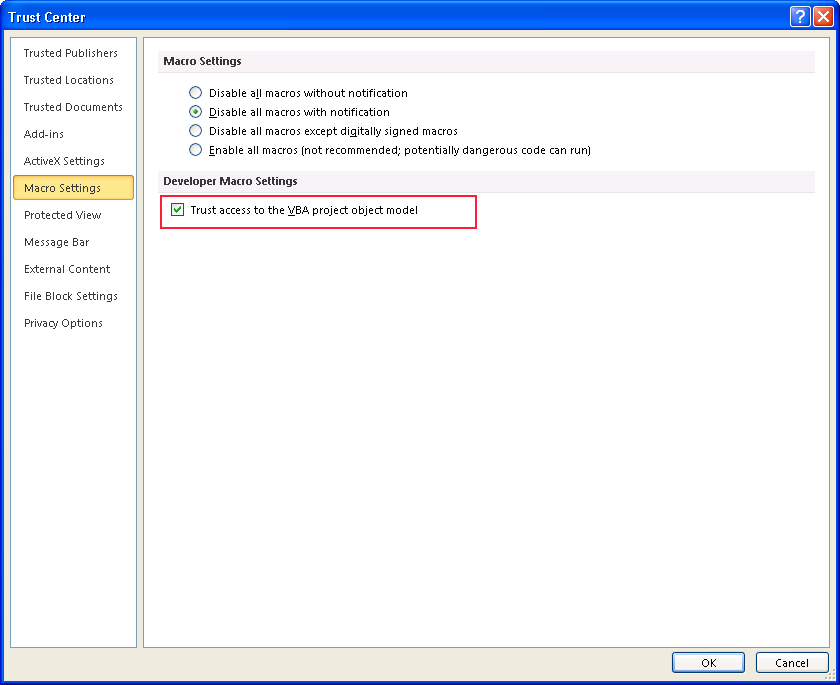
I ran recently ran an old bit of Excel VBA in Excel 2010 which automatically adds the Microsoft Scripting Runtime to the workbook for me. Rather annoyingly, I was getting a Method VBProject of _workbook Failed error.

I solved this by going into the Options > Trust Center > Trust Centre Settings... Choosing Macro Settings and then checking the Trust access to the VBA project object model checkbox.


The code to add the reference in case that helps too ;)

Public Sub SomeMethod()

    AddReference "C:\WINDOWS\system32\scrrun.dll"

End Sub

Private Sub AddReference(sFile As String)
Dim i As Integer
Dim bFound As Boolean

    bFound = False
    For i = 1 To ActiveWorkbook.VBProject.References.Count
        If ActiveWorkbook.VBProject.References.Item(i).FullPath = sFile Then
            bFound = True
            Exit For
        End If
    Next i
    If Not bFound Then
        ActiveWorkbook.VBProject.References.AddFromFile sFile
    End If
End Sub

Wednesday, 30 January 2013

OpenVPN Client: Import Error Cannot Read ca Directive

I was following instructions to import an OpenVPN connection and got the following error:

IMPORT_ERROR: Profile or its references could not be read: cannot process OpenVPN file: cannot read file for OpenVPN 'ca' directive: [Errno 2] No such file or directory:

Seemed odd! As when I re-read the error message the path it was using was C:\Program Files\OpenVPN Technologies\OpenVPN Client\config and not the path it was installed under (C:\Program Files (x86)\OpenVPN Technologies\OpenVPN Client\config).

I fixed this by creating he config folder in the Program Files folder and not the Program Files (x86) folder. The connection imported fine.

Sunday, 20 January 2013

SSRS: Table KeepTogether Not Working

I was recently having a problem with SQL Server Reporting Services 2005 edition trying to stop a table control from breaking over a page. The obvious solution was to set the KeepTogether property to True. Wrong! Well, not exactly. It does keep the table together and not split it over a page, but only the detail! Headers and footers are not included.

I did some extensive trawling and couldn't find an easy solution - but there is one...

Drop the table into a list control and set the KeepTogether property to True on the list.

This works beautifully for me and is really easy. The only thing you need to do is make sure that the list is the same size the table (and that's optional). Thus making sure it doesn't exceed the page width and so on.

Monday, 24 December 2012

How To Schedule Sending an Email with GMail

If you need to send scheduled emails from GMail  or Goolge Apps, use Boomerang. It's mega easy and you are able to send 10 a month on their free subscription. There's a mobile version of it you can access here. I haven't used the mobile version yet, but almost certainly will be.

Friday, 21 December 2012

MSSQL: Create an Audit Structure in SQL Server

I was looking at creating an audit trail for data changes in a SQL Server database. There are many mechanisms for doing this and I decided on having a duplicate table to store the audit trail in. So for example:

Base Table: User.Person
    PersonID int
    Name varchar(100)

Audit Table: Audit.Person
    AuditID int IDENTITY(1,1)
    Action char(1)
    Date datetime
    PersonID int
    Name varchar(100)

So the idea is that for each action that occurs (INSERT, UPDATE, DELETE), the data as it was prior to the action is stored into the associated audit table. Obviously in the case of an INSERT the new ID is stored as there was no data prior to the action.

Each base table has a matching TRIGGER on it. This trigger looks like this:

CREATE TRIGGER [User].[TRG_Person_AuditHandle]
   ON  [User].[Person]
   AFTER INSERT, DELETE, UPDATE
AS 
BEGIN
	IF (SELECT COUNT(1) FROM deleted) > 0 AND (SELECT COUNT(1) FROM inserted) > 0
		INSERT INTO [Audit].[Person] ([Action], [PersonID], [Name])
		SELECT 'U', [PersonID], [Name] FROM deleted
	ELSE IF (SELECT COUNT(1) FROM inserted) > 0
		INSERT INTO [Audit].[Person] ([Action], [PersonID])
		SELECT 'I', [PersonID] FROM inserted
	ELSE IF (SELECT COUNT(1) FROM deleted) > 0
		INSERT INTO [Audit].[Person] ([Action], [PersonID], [Name])
		SELECT 'D', [PersonID], [Name] FROM deleted
END

This now gives a full audit trail to the Person table.

Here's a wicked script to create all the audit tables and the triggers for the base tables:

/*
	Creates the audit data structure for all requried tables
	+ Creates the audit table to hold the changes in
	+ Creates the trigger on the base table to add to the audit table
*/
DECLARE @SQL_DROP_AUDIT_TABLE varchar(MAX),
		@SQL_CREATE_AUDIT_TABLE varchar(MAX),
		@SQL_DROP_AUDIT_TRIGGER varchar(MAX),
		@SQL_CREATE_AUDIT_TRIGGER varchar(MAX)

SET @SQL_DROP_AUDIT_TABLE =
'IF  EXISTS (SELECT * FROM dbo.sysobjects WHERE id = OBJECT_ID(N''[DF_#TABLE_NAME#_Date]'') AND type = ''D'')
	ALTER TABLE [Audit].[#TABLE_NAME#] DROP CONSTRAINT [DF_#TABLE_NAME#_Date]
GO
IF  EXISTS (SELECT * FROM sys.objects WHERE object_id = OBJECT_ID(N''[Audit].[#TABLE_NAME#]'') AND type in (N''U''))
	DROP TABLE [Audit].[#TABLE_NAME#]
GO'

SET @SQL_CREATE_AUDIT_TABLE = 
'CREATE TABLE [Audit].[#TABLE_NAME#](
	[AuditID] int IDENTITY(1,1) NOT NULL,
	[Action] char(1) NOT NULL,
	[Date] datetime NOT NULL,
	#COLUMNS#
 CONSTRAINT [PK_Audit_#TABLE_NAME#] PRIMARY KEY CLUSTERED 
(
	[AuditID] ASC
)WITH (PAD_INDEX  = OFF, STATISTICS_NORECOMPUTE  = OFF, IGNORE_DUP_KEY = OFF, ALLOW_ROW_LOCKS  = ON, ALLOW_PAGE_LOCKS  = ON) ON [PRIMARY]
) ON [PRIMARY]
GO
ALTER TABLE [Audit].[#TABLE_NAME#] ADD  CONSTRAINT [DF_Audit_#TABLE_NAME#_Date]  DEFAULT (getdate()) FOR [Date]
GO'

SET @SQL_DROP_AUDIT_TRIGGER = 
'IF  EXISTS (SELECT * FROM sys.triggers WHERE object_id = OBJECT_ID(N''[#SCHEMA_NAME#].[TRG_#TABLE_NAME#_AuditHandle]''))
	DROP TRIGGER [#SCHEMA_NAME#].[TRG_#TABLE_NAME#_AuditHandle]
GO'

SET @SQL_CREATE_AUDIT_TRIGGER =
'CREATE TRIGGER [#SCHEMA_NAME#].[TRG_#TABLE_NAME#_AuditHandle]
   ON  [#SCHEMA_NAME#].[#TABLE_NAME#]
   AFTER INSERT, DELETE, UPDATE
AS 
BEGIN
	IF (SELECT COUNT(1) FROM deleted) > 0 AND (SELECT COUNT(1) FROM inserted) > 0
		INSERT INTO [Audit].[#TABLE_NAME#] ([Action],#COLUMNS#)
		SELECT ''U'',#COLUMNS# FROM deleted
	ELSE IF (SELECT COUNT(1) FROM inserted) > 0
		INSERT INTO [Audit].[#TABLE_NAME#] ([Action], [#ID_COLUMN#])
		SELECT ''I'', [#ID_COLUMN#] FROM inserted
	ELSE IF (SELECT COUNT(1) FROM deleted) > 0
		INSERT INTO [Audit].[#TABLE_NAME#] ([Action],#COLUMNS#)
		SELECT ''D'',#COLUMNS# FROM deleted
END
GO'

-- Get all tables
DECLARE @SQL varchar(MAX), @SQLAuditTrigger varchar(MAX)
DECLARE @Schema varchar(255), @Table varchar(255), @SchemaTable varchar(255)
DECLARE cTables CURSOR FAST_FORWARD READ_ONLY
FOR
	SELECT TABLE_SCHEMA, TABLE_NAME, '[' + TABLE_SCHEMA + '].[' + TABLE_NAME + ']' AS [SCHEMA_TABLE]
	FROM INFORMATION_SCHEMA.TABLES
	WHERE TABLE_SCHEMA NOT IN ('PUT_SCHEMA_NAME_FILTERS_HERE_IF_REQUIRED')
	AND TABLE_NAME NOT IN ('PUT_TABLE_NAME_FILTERS_HERE_IF_REQUIRED')
	ORDER BY TABLE_SCHEMA, TABLE_NAME
OPEN cTables

-- Loop each table
FETCH NEXT FROM cTables INTO @Schema, @Table, @SchemaTable
WHILE (@@FETCH_STATUS <> -1)
BEGIN
	IF (@@FETCH_STATUS <> -2)
	BEGIN
		-- Used to hold the column SQL that gets built for the CREATE statement
		DECLARE @ColumnSQL varchar(MAX) = '', @TriggerColumnSQL varchar(MAX) = ''
		
		-- Get all columns for a table
		DECLARE @Column varchar(255), @Position int, @DataType varchar(255), @DataLength float
		DECLARE cColumns CURSOR FAST_FORWARD READ_ONLY
		FOR
			SELECT COLUMN_NAME, ORDINAL_POSITION, DATA_TYPE, CHARACTER_MAXIMUM_LENGTH
			FROM INFORMATION_SCHEMA.COLUMNS
			WHERE TABLE_SCHEMA = @Schema
			AND TABLE_NAME = @Table
			ORDER BY ORDINAL_POSITION
		OPEN cColumns
		
		-- Loop each column
		FETCH NEXT FROM cColumns INTO @Column, @Position, @DataType, @DataLength
		WHILE (@@FETCH_STATUS <> -1)
		BEGIN
			IF (@@FETCH_STATUS <> -2)
			BEGIN
				-- Set up if it's the first column of a table
				IF @Position = 1
				BEGIN
					-- Compile the drop statments and execute
					SET @SQL = REPLACE(@SQL_DROP_AUDIT_TABLE, N'#TABLE_NAME#', @Table)
					PRINT @SQL
					--EXEC(@SQL)
					SET @SQL = REPLACE(REPLACE(@SQL_DROP_AUDIT_TRIGGER, N'#TABLE_NAME#', @Table), N'#SCHEMA_NAME#', @Schema)
					PRINT @SQL
					--EXEC(@SQL)
					
					-- Prepare the create statement (no columns in it at this point
					SET @SQL = REPLACE(@SQL_CREATE_AUDIT_TABLE, N'#TABLE_NAME#', @Table)
					--PRINT @SQL
					SET @SQLAuditTrigger = REPLACE(REPLACE(REPLACE(@SQL_CREATE_AUDIT_TRIGGER, N'#TABLE_NAME#', @Table), N'#SCHEMA_NAME#', @Schema), N'#ID_COLUMN#', @Column)
					--PRINT @SQLAuditTrigger
				END
				
				-- Build in the columns
				SET @TriggerColumnSQL = @TriggerColumnSQL + ' [' + @Column + '],'
				SET @ColumnSQL = @ColumnSQL + '[' + @Column + '] '
				SET @ColumnSQL = @ColumnSQL + 
					CASE
						WHEN @DataType = 'varchar' OR @DataType = 'nvarchar' OR @DataType = 'char' OR @DataType = 'nchar' THEN
							CASE
								WHEN (@DataType = 'varchar' OR @DataType = 'nvarchar') AND @DataLength = -1 THEN
									@DataType + '(MAX)'
								ELSE
									@DataType + '(' + CAST(@DataLength AS varchar(MAX)) + ')'
							END
						ELSE
							@DataType
					END
				SET @ColumnSQL = @ColumnSQL + ' NULL, '
				
				-- If it's the last column then compile and execute the CREATE statements
				IF (SELECT COUNT(1) FROM INFORMATION_SCHEMA.COLUMNS WHERE TABLE_SCHEMA = @Schema AND TABLE_NAME = @Table) = @Position
				BEGIN
					SET @SQL = REPLACE(@SQL, N'#COLUMNS#', @ColumnSQL)
					PRINT @SQL
					--EXEC(@SQL)
					
					SET @SQL = REPLACE(@SQLAuditTrigger, N'#COLUMNS#', SUBSTRING(@TriggerColumnSQL, 1, LEN(@TriggerColumnSQL) - 1))
					PRINT @SQL
					--EXEC(@SQL)
				END
			END
		
			FETCH NEXT FROM cColumns INTO @Column, @Position, @DataType, @DataLength
		END
	END

	 -- Tidy columns
	CLOSE cColumns
	DEALLOCATE cColumns
	
	FETCH NEXT FROM cTables INTO @Schema, @Table, @SchemaTable
END

 -- Tidy tables
CLOSE cTables
DEALLOCATE cTables

You'll see I'm using schemas - obviously if you are not, then change it ;) It assumes that the first column in the table is the unique identifier to the row.

Wednesday, 19 December 2012

Insert Into a Table With Only One Identity Column

If you have a table that as only one column and that column is an identity column, then in order to INSERT into it, you need to use this statement:

INSERT INTO [MyTable] DEFAULT VALUES

This works in SQL Server 2008 and I haven't tested in earlier versions.

In SQL Server 2012, we have the introduction of a SEQUENCE. You could consider using one of those as an alternative.

Friday, 7 December 2012

UTF8 / Unicoding Body of PHP PEAR Email

Further to the previous article I wrote about unicoding an email subject in PHP, I was getting issues with the body not UTF8 encoding correctly either. When I used the Mail_mime object (as I was sending attachements), the standard Content-Type of text/html; charset=utf-8 in the headers was not enough.

I hunted around and came across a comment posted on the PEAR manual site. So courtesy of fredrik@krafftit.se I modded my code as follows and all worked well :)

$mimeParams = array(
 "text_encoding" => "8bit",
 "text_charset" => "UTF-8",
 "html_charset" => "UTF-8",
 "head_charset" => "UTF-8"
);

$body = $mime->get($mimeParams);

Tuesday, 4 December 2012

A Project With the Name ScriptComponent Already Exists

Rather annoyingly I recently had A project with the name 'ScriptComponent' already exists error when opening up a script component in an SSIS package. After some extensive searching I only found 1 article of any use, which didn't solve my problem.

This is the pop-up I was getting:


How did it happen?
This is truly stunning! Everything I found was related to installing SQL Server Service Pack 2. Not me! I copied a data flow task (containing a script component) from one dtsx in the solution and pasted it to another dtsx in the same solution. I then deleted the data flow task from the "old" dtsx file. Each time opened the "new" script component or in fact any script component in the solution (or any other solution I open), I got the error - brilliant!

Things I also tried...
I tried all these with no success:
  1. Whatever was suggested in the above mentioned article.
  2. Un-installed Integration Services and re-installed (latest service pack applied).
  3. Un-installed and then re-installed Visual Studio 2005 and SQL Server 2005 (latest service packs applied (including the SP1 update for Windows Vista)).
What happened in the end?
I gave up and after spending 2 days trying to fix it, I re-installed Windows!

Moral of this story:
DON'T COPY AND PASTE A SCRIPT COMPONENT IN AN SSIS PACKAGE

Tuesday, 20 November 2012

MSSQL: Date Last Data Change Occurred on a Table

I needed to find out when the data was changed on a table in SQL Server. Unfortunately, I don't have the article I found it on in the mighty Stackoverflow, but here it is:

SELECT TABLENAME, LASTUPDATED
FROM (
        SELECT B.NAME AS 'TABLENAME',
               MAX(STATS_DATE (ID,INDID)) AS LASTUPDATED
        FROM SYS.SYSINDEXES AS A
        INNER JOIN SYS.OBJECTS AS B ON
                A.ID = B.OBJECT_ID
        WHERE B.TYPE = 'U'
        AND STATS_DATE (ID, INDID) IS NOT NULL 
        GROUP BY B.NAME
) AS A
ORDER BY LASTUPDATED DESC

A really useful bit SQL!

Monday, 12 November 2012

HTMLtweaks mBox & mForm with ASP.NET

I was recently looking around for a nice mootools implementation of a modal box and found many. I settled on one that I find brilliant and deserves much credit: HTMLtweaks mBox & mForm by Stephan Wagner.

I needed to use multiple features that mBox & mForm offer, but was struggling to get the correct configuration for it to all work with ASP.NET postbacks. Individually and certain combinations were working great but the not the full compliment for me. I got it working though and here's how:

Scenario
I wanted to use an mForm to make the form and it's elements sweeter, with validation and tooltips (using mBox). I also wanted to take advantage of the mForm.Submit features to get a confirmation when the user attempts to submit the page.

The Problem
The form, validation and tooltip, without the mForm.Submit confirmation options worked fine. When I introduced the confirmation, the form was not validated and submitted. As the form contents were not valid, I was getting an invalid submit.

The Solution
Some info:
  • I have a JavaScript file called core.js that I have included on the page
  • I am using a Master page
Firstly the markup. In the interest of keeping this concise, I have not included the full page. If you have got this far, you know all about that ;)


Email Address
Password

This is a very basic login form (albeit the form element is not shown). I have included the data-required attributes and on the email address asp:TextBox also added the data-validate attribute. Under each element, I have added the markup to be used in the tooltip. Finally, the asp:Button has the CssClass added and the server-side OnClick event tied in. I have included the data-confirm attruibute, with a suitable message and added the a JavaScript function (confirmSubmit()) to the data-confirm-action attribute. Noticed the asp:LinkButton? More on that in a bit...

In core.js, I created a function called doTips(). This processes a JSON array of elements to use to tie the tips into.


function doTips(elements) {
    for (i = 0; i < elements.length; i++) {
        new mBox.Tooltip({
            content: elements[i].tip,
            attach: elements[i].element,
            event: 'mouseenter',
            position: {
                x: 'right',
                y: 'center'
            },
            delayOpen: 500
        });
    }
}

This gets called during the domready event on the page, as such:

doTips([
 {element: '<%=txtEmail.ClientID%>', tip: 'txtEmail_Info'},
 {element: '<%=txtPassword.ClientID%>', tip: 'txtPassword_Info'}
]);

The ClientID of the element to attach is sent, along with the element that has the tip in it.

Now to getting the form to submit with a confirmation and validation! In core.js I created a function called setUpSubmitForm(). This configures the mForm.Submit object.

frmSubmit = null;

function setUpSubmitForm() {
    frmSubmit = new mForm.Submit({
        form: 'fMaster',
        ajax: false
    });
    frmSubmit.validateOnSubmit = false;
}

The keen eye will notice the use of validateOnSubmit being set to false outside the declaration of the object. This is done for two reasons. Firstly, when the submit button is pressed, the form should not be submitted. Secondly, when the object is declared, it must have the validateOnSubmit property set to true in order for the validation to work.

This also gets called in the domready event.

Finally to tie it all together, I put the confirmSubmit() function onto the page. I did it this way to allow for custom actions prior to the validation and submit taking place.

function confirmSubmit() {
 _confirmSubmit('<%=btnLogin.UniqueID%>');
}

It quite simply calls _confirmSubmit that lives in core.js. The key thing to note here is that I am sending through the UniqueID of the login button. This is what _confirmSubmit() does:

function _confirmSubmit(elementUniqueID) {
    if (frmSubmit.validate()) {
        __doPostBack(elementUniqueID);
    }
}

I test to see if the form validates successfully and if so, fire the __doPostBack .NET created function, passing through the control that fired the event. The onClick server-side event now gets picked up.

So, what about the asp:LinkButton - what's that all about? Only certain controls will force .NET to create the __doPostBack  function on the page. By adding an asp:LinkButton, the code is added by the framework. Obvisouly if you have other controls on the page that create the function, then it doesn't need to be added.

Another Point...
Depending on your site configuration, you may get an Invalid postback or callback argument exception. There are a few ways to get round the problem and they are pretty well documented all over. Using EnableEventValidation in the page directives or web.config is one option, but a safer method is to use the Page.ClientScript.RegisterForEventValidation(myButton.UniqueID). I haven't got the ClientScript option working yet, but I'm sure I'll work it out at some point.

Thursday, 25 October 2012

HttpContext.Current.Session is null

Had a funny one with an ASP.NET 4.0 C# project I am working on. I moved my session handling into a class to keep things tidy. I started getting the old reference to a null object error when trying to access a session variable.

This initially confused me a little as I was already doing an if (context.Session["myvar"] == null) on it. I then realised that it was the Session object itself that was null. I did a lot of hunting around on Google - and there are hundreds of responses (HttpContext.Current.Session is null). None of them were working for me.

I had checked that sessions were enabled and that the Session_Start event was firing in Global.asax.cs. The most useful article I came across was this one on stackoverflow.

My session handling class was using private static HttpContext context = HttpContext.Current; so that I had a shorthand to the Session object (context.Session). I swapped out the shorthand to use the full path to it (HttpContext.Current.Session) and we were off - all working!

Friday, 12 October 2012

How to Play MP4 Files on Your Xbox 360 - Part 2

Following on from my original article of playing MP4 files on your Xbox 360, I have finally found a conversion tool that works well for me, if changing the extension to avi doesn't work.

I am using XMedia Recode. It's pretty straight forward:

  1. Drag the file(s) into the application that you want to be converted
  2. Make sure you have the settings, as shown below, selected
  3. Click the file, that was dragged in, and click Add Job
  4. Click the Jobs tab to see the file(s) all listed ready to go
  5. Click the Encode button

Once the conversion has completed (the speed of this is dependent on the processing power of your PC), change the file extension from mp4 to avi. Happy viewing!

Labels

.net (7) ajax (1) android (7) apache (1) asp.net (3) asus (2) blogger (2) blogspot (3) c# (16) compact framework (2) cron (1) css (1) data (1) data recovery (2) dns (1) eclipse (1) encryption (1) excel (1) font (1) ftp (1) gmail (5) google (4) gopro (1) html (1) iis (3) internet explorer IE (1) iphone (1) javascript (3) kinect (1) linux (1) macro (1) mail (9) mercurial (1) microsoft (3) microsoft office (3) monitoring (1) mootools (1) ms access (1) mssql (13) mysql (2) open source (1) openvpn (1) pear (2) permissions (1) php (12) plesk (4) proxy (1) qr codes (1) rant (4) reflection (3) regex (1) replication (1) reporting services (5) security (2) signalr (1) sql (11) sqlce (1) sqlexpress (1) ssis (1) ssl (1) stuff (1) svn (2) syntax (1) tablet (2) telnet (3) tools (1) twitter (1) unix (3) vb script (3) vb.net (9) vba (1) visual studio (2) vpc (2) vpn (1) windows (4) woff (1) xbox 360 (1)